

Description
Streamline Task Import with Asana Importer
Overview
Asana Importer is a desktop application designed to simplify the process of transferring task data from CSV files into Asana. The tool supports importing structured data such as task names, deadlines, sub-tasks, and tags directly into Asana projects. It is particularly useful for teams or individuals transitioning from spreadsheets to Asana, enabling faster onboarding and improved task visibility. The software operates as a Chrome app, integrating directly with the browser environment to streamline workflow.
Users can assign imported tasks to specific team members within designated workspaces or projects. The application supports both simple lists and complex CSV formats that include metadata like due dates and task hierarchies. This flexibility makes it suitable for project managers, team leads, and productivity-focused professionals managing multiple workflows. The developer, Recurship, has focused on usability and compatibility with Asana’s API, ensuring smooth integration without requiring advanced technical knowledge.
Real-world usage scenarios include migrating legacy project data, organizing sprint backlogs, or setting up new project templates. The tool does not require manual entry of each task, reducing time and minimizing human error. The developer did not provide additional system requirements beyond the supported operating systems.
Key Features & Capabilities
- CSV Import Support – Accepts CSV files (not XLS) for task data migration into Asana. Ideal for users who maintain task lists in spreadsheets.
- Advanced Task Mapping – Allows setting tags, deadlines, and sub-tasks within the CSV format, enabling structured task creation.
- Assignment to Team Members – Tasks can be assigned to specific users within chosen workspaces or projects during import.
- Project Search & Selection – Includes a searchable field to locate and select target projects, with results sorted by name.
- Personal Access Token Authentication – Supports Asana Personal Access Tokens instead of API keys, simplifying setup and improving security.
- Sample File Access – Provides a downloadable sample CSV template to guide users on proper formatting.
For example, a project manager can prepare a CSV with task names, due dates, sub-tasks, and assigned team members, then import it all at once. This eliminates repetitive manual input and ensures consistency across projects. The ability to use personal access tokens enhances security by reducing reliance on long-term API keys. The tool also includes bug fixes and improvements in version 16, such as better handling of API rate limits and expanded project fetching capabilities.
User Interface, Workflow & Performance
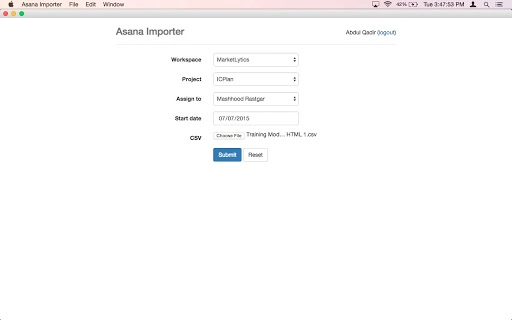
The user interface of Asana Importer is minimalistic and focused on core functionality. It features a clean layout with clear input fields for file selection, project assignment, and authentication token entry. Navigation is straightforward, with a step-by-step flow that guides users through the import process.
Workflow efficiency is high, as users can prepare their CSV file in advance, authenticate once, and complete the import in a few clicks. The application leverages the Chrome app environment, which may influence performance depending on browser load and system resources. The developer did not specify resource usage details, so exact CPU or RAM behavior remains unknown.
Performance observations are based on general software behavior patterns. The tool appears stable during typical use, with no reported crashes or freezes in the provided changelog. The update history includes fixes for sub-task display and assignment issues, indicating ongoing attention to usability and reliability. Overall, the application maintains a responsive feel during file upload and project selection.
Compatibility & System Requirements
Asana Importer is compatible with Windows, Mac, and Linux operating systems, making it accessible to a broad user base. The application is distributed as a Chrome app, meaning it runs within the Chrome browser environment. The installation size is 2.5 MB, indicating a lightweight footprint.
Exact system requirements were not listed. The developer did not specify minimum hardware specifications, such as RAM or processor type. Compatibility information is limited to the supported platforms. Users are advised to ensure their system has a recent version of Google Chrome installed to run the app properly.
Pros and Cons
Pros
- Simple and intuitive interface for quick task imports
- Supports complex task structures including sub-tasks and deadlines
- Uses secure personal access tokens instead of API keys
- Free to use with no hidden costs
- Offers a sample CSV file for proper formatting guidance
Cons
- Only supports CSV files, not XLS or XLSX formats
- Requires Google Chrome to run, limiting standalone use
- Limited system requirements documentation
- Dependent on Asana’s API availability and rate limits
- No built-in error reporting for failed imports
FAQ Section
Is Asana Importer compatible with all versions of Chrome?
The application is designed to work with current and recent versions of Google Chrome. Users should ensure their browser is up to date for optimal performance.
Can I use this tool offline?
Asana Importer requires an active internet connection to authenticate with Asana’s API and transfer data. It cannot function fully offline.
Is my data secure when using the tool?
Yes, the tool uses Asana Personal Access Tokens, which are more secure than API keys. Data is transmitted over encrypted connections, and no sensitive information is stored locally.
How often does the software receive updates?
Updates are released periodically, with the latest version being v16. The changelog includes bug fixes and feature improvements, indicating ongoing development.
What kind of CSV format does the tool accept?
The tool accepts a predefined CSV structure that supports task names, deadlines, sub-tasks, tags, and team assignments. A sample file is available at the provided link for reference.
Final Thoughts
Asana Importer delivers a focused and efficient solution for teams and individuals looking to migrate task data from spreadsheets into Asana. Its ability to handle complex task hierarchies and assign tasks to team members directly during import makes it a valuable tool for project setup and data migration. The use of personal access tokens enhances security, while the free pricing model removes financial barriers to adoption.
While it has limitations—such as lack of XLS support and dependency on Chrome—the tool excels in its niche. It is ideal for productivity-focused professionals, project managers, and teams transitioning from spreadsheet-based planning to Asana. The lightweight design and straightforward workflow ensure minimal friction during use.
With continuous updates and a clear commitment to usability, Asana Importer stands out as a reliable choice for streamlined task import. Download Asana Importer now.
Guides & Tutorials for Asana Importer App for Chrome
How to install Asana Importer App for Chrome
- Click the Preview / Download button above.
- Once redirected, accept the terms and click Install.
- Wait for the Asana Importer App for Chrome download to finish on your device.
How to use Asana Importer App for Chrome
This software is primarily used for its core features described above. Open the app after installation to explore its capabilities.
User Reviews for Asana Importer App for Chrome 0
No reviews found





